 Loom
LoomField science generates a lot of media: photographs from the ablation zone, video of calving events, timelapse sequences, and drone footage. This post documents how to embed all of it in a Loom post, and covers the four callout block types along the way.
Photo galleries
Use the gallery include with an array of images in front matter. Each image takes a src path, an alt description (required for accessibility), and an optional caption shown in the lightbox.
gallery:
  - src: /assets/images/matterhorn.jpg
    alt: "Matterhorn from Gornergrat"
    caption: "Gornergrat, 3089 m. September 2019."
  - src: /assets/images/matterhorn.jpg
    alt: "Gorner Glacier confluence"
    caption: "The confluence of the Gorner and Grenzgletscher."
Then in the post body:
{% include gallery.html %}
The result is a three-column responsive grid. Click any image to open the lightbox. Navigate with the arrow keys or on-screen buttons; close with Esc.
Image sizing: Thumbnails are cropped to a 4:3 aspect ratio using object-fit: cover. The lightbox shows images at their natural size, constrained to the viewport. A good target is 1600 × 1200 px for lightbox quality.
Photo carousels
When you want to show a sequence of images one at a time rather than a grid, use the carousel include. The format is identical to the gallery.
{% include carousel.html %}
Or pass an explicit array:
{% include carousel.html images=page.demo_carousel %}
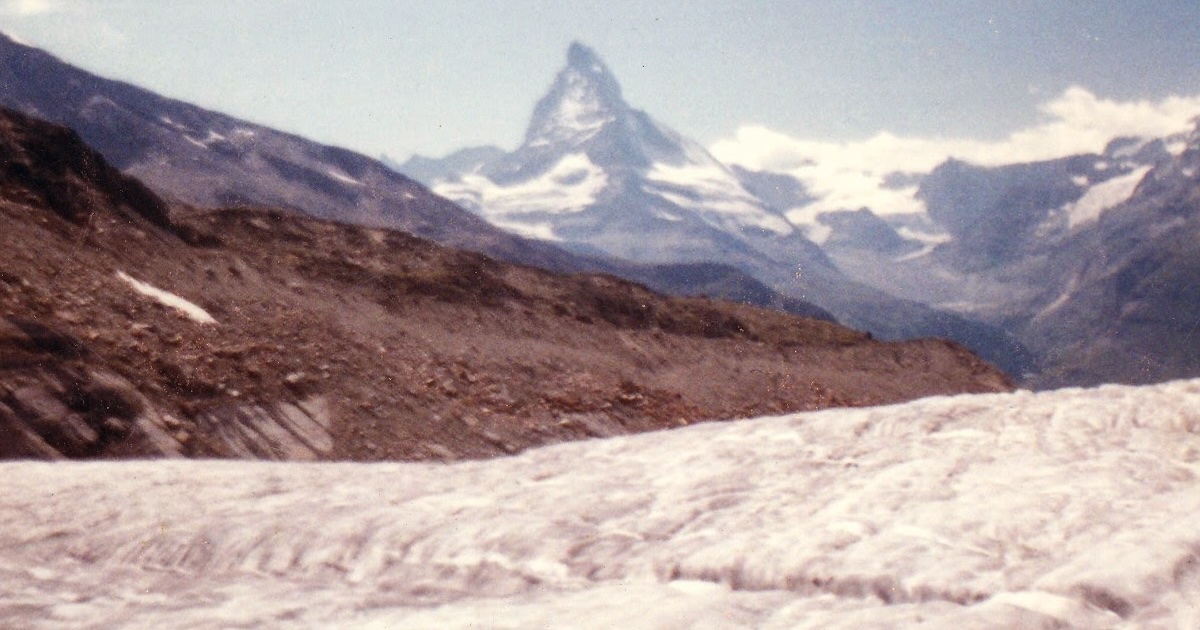
Matterhorn from Gornergrat station. The Gorner Glacier fills the valley below.
Confluence of the Gorner and Grenzgletscher, showing medial moraine.
Surface channels and cryoconite holes in the ablation zone.
The proglacial lake at the Gorner terminus, expanding since the 1980s.
Navigate with the on-screen prev/next buttons or the dot indicators below the image. The carousel does not open a lightbox — it is designed for curated sequential storytelling rather than a browsable collection. Use a gallery when readers need to scan all images at once; use a carousel when order and pacing matter.
Native video
Self-hosted video files use the video include. The player is a styled native HTML5 <video> element — no third-party player required.
{% include video.html
   src="/assets/video/gorner-timelapse.mp4"
   poster="/assets/images/gorner-poster.jpg"
   caption="Gorner Glacier timelapse, summer 2019. 48 frames over 6 weeks." %}
File size: Video files can be large. Compress to H.264 at 1080p before committing. A 60-second timelapse should compress to under 10 MB. For longer videos, use YouTube or Vimeo instead and embed with the embed include below.
Parameters
| Parameter | Required | Description |
|---|---|---|
src |
Yes | Path to the .mp4 file |
poster |
No | Thumbnail shown before playback |
caption |
No | Caption below the player |
loop |
No | Repeat continuously (loop="true") |
autoplay |
No | Start immediately — forces mute |
YouTube and Vimeo embeds
The embed include wraps any YouTube or Vimeo URL in a responsive 16:9 container. YouTube URLs are automatically rewritten to youtube-nocookie.com.
{% include embed.html
   url="https://www.youtube.com/embed/x1SgmFa0r04?si=mCkXoLDafmHUzAMk"
   caption="NASA Scientific Visualization: a year of Earth's CO₂ flux." %}
Vimeo works identically:
{% include embed.html url="https://vimeo.com/123456789" caption="Caption" %}
Privacy mode: YouTube embeds use youtube-nocookie.com rather than youtube.com. No cookies are set on the visitor's browser until they press play — an important distinction under ePrivacy rules.
Callout blocks
Loom has four callout variants for drawing attention to different types of information.
Note — tips, clarifications, supplementary context:
<div class="callout callout-note">
  <span class="callout-icon">💡</span>
  <div class="callout-body">
    <p>Your note content here.</p>
  </div>
</div>
Warning — things that can go wrong, caveats, destructive actions:
<div class="callout callout-warning">
  <span class="callout-icon">⚠️</span>
  <div class="callout-body">
    <p>Your warning content here.</p>
  </div>
</div>
Definition — terminology, acronyms, key concepts:
<div class="callout callout-definition">
  <span class="callout-icon">📖</span>
  <div class="callout-body">
    <p><strong>Term:</strong> Definition text.</p>
  </div>
</div>
Takeaway — the key point to remember from a section:
<div class="callout callout-takeaway">
  <span class="callout-icon">✓</span>
  <div class="callout-body">
    <p>The key takeaway from this section.</p>
  </div>
</div>
For images and short clips: use the gallery and video includes, self-hosted. For longer video: use YouTube or Vimeo with the embed include. Callout blocks are raw HTML — paste the snippet and fill in the content.
Co-authorship
This post is co-authored, which demonstrates the multi-author system. In front matter, pass an array of author slugs:
author: [paul-hobson, sophie-marchand]
Both names render as links in the byline and author card. Each author’s profile page at /author/their-slug/ will include this post in their listing. Author data lives in _data/authors.yml.